
U.S. business guide. Legal and platform sources checked October 17, 2026.
You paid for the website. Your logo is on it. Customers use it every day.
So it belongs to you. Right?
Then you ask your agency a simple question: “Can you send me everything I need to move the site?”
The answer is suddenly complicated.
“The hosting is part of our package.” “You have an editor account.” “Those licenses belong to us.” “We can discuss a buyout.”
Now you are wondering whether changing providers could interrupt your email, erase your reporting history, or force you to pay for another website. You may even stay in an unsatisfying relationship because leaving feels more dangerous than another disappointing invoice.
That uncertainty deserves a clear answer. Website ownership involves several separate rights and systems. You might own your photographs while licensing your theme. You might control the content dashboard while someone else controls the domain. You might have permission to use a website without having everything needed to run it independently.
This guide explains four traps, the evidence to request, and the steps that make your options clearer before a disagreement becomes an emergency.

Do I Own My Website After an Agency Builds It?
Possibly—but payment alone does not establish every ownership right, account permission, or ability to move the website. Start with three separate questions: What rights does your agreement give you? Which accounts can your business control? Can the working website be transferred or restored?
Federal copyright law distinguishes ownership of a copy from ownership of copyright. Copyright transfers generally require a signed writing, subject to statutory exceptions. Paying an invoice and receiving a finished site are therefore different from receiving an assignment of the relevant copyright.
| Website component | What you need to establish | Useful evidence |
| Domain registration | Your business’s registration rights and ability to manage the domain | Registrar agreement, registrant details, account access and renewal records |
| Custom code and original content | Ownership or sufficiently broad rights to use, modify and move the work | Signed assignment or applicable license; subcontractor documentation |
| Themes, fonts, photographs and plugins | The permissions and subscriptions covering each item | License terms, purchase records and renewal responsibilities |
| Hosting and website platform | Who controls the service and what can be exported | Account roles, billing records and platform documentation |
| Files and database | Whether you can obtain and restore a complete working copy | Current backup and successful restore test |
| Analytics, tags and CRM | Whether authorized people in your business can administer the correct accounts | Account IDs, role lists, recovery arrangements and tested exports |
This is also worth addressing when the agency relationship is healthy. An organized provider may use shared infrastructure for perfectly legitimate reasons. The practical question is whether the arrangement is documented and whether your agreed rights can actually be exercised.
When comparing website design services, ask how these components will be documented at launch. A handover plan belongs in the buying decision, alongside design, performance and price.

Trap 1: Do I Own the Code and All Files on Final Payment?
The trap: assuming that “paid in full” means every creative and technical right has transferred.
This misunderstanding can feel deeply unfair. You funded the project, supplied the business knowledge and approved the work. Being told later that you cannot take parts of it elsewhere can feel like being charged twice for the same asset.
Under 17 U.S.C. §201, copyright initially belongs to the author, with rules for works made for hire. Section 204 generally requires a signed writing for a copyright ownership transfer other than one occurring by operation of law. Your actual agreement and the chain of rights matter.
Be careful with the phrase “work made for hire.” The Copyright Office explains that it covers employee work within the scope of employment, or certain specially commissioned works meeting specific statutory requirements. An independent contractor agreement does not make every website deliverable a work made for hire simply by using that label. An appropriate signed assignment can address rights that do not qualify.
There is another layer: the agency may have hired a freelance developer, copywriter or photographer. Ask whether it obtained the rights it is promising to transfer. A promise covering “all intellectual property” needs a clear explanation of what the agency actually owns and what belongs to others.
| Asset or deliverable | Question to resolve before handover | What a clear answer should identify |
| Bespoke code | What rights transfer, and when? | Defined deliverables, transfer conditions and exclusions |
| Editable design files | Are working files included, or only the published result? | File formats, delivery method and included assets |
| Agency frameworks | Can another developer maintain the website using them? | License scope, restrictions and continuing charges |
| Stock images and fonts | Does the license cover our intended use after we leave? | License holder, permitted uses and any replacement requirement |
| Premium plugins | What changes if the agency subscription ends? | Update access, support, functionality and replacement costs |
You do not need exclusive ownership of every component to operate a sound website. WordPress itself is distributed under the GNU General Public License. Using licensed software is normal; it does not give you exclusive ownership of that software.
The goal is to understand your rights and obligations. For custom website development, make source repositories, deployment instructions and third-party dependencies part of the scope discussion. Receiving legal rights without the practical files can still leave your next developer unable to work efficiently.
Trap 2: How Do I Move My Website and Domain Without Downtime?
The trap: your company appears on the website, but someone else’s account controls the address and the systems attached to it.
Your domain can affect far more than the homepage. DNS records connect it to your website, business email, verification services and other tools. A rushed change can disrupt customer communication even while the website looks fine.
Check the domain inside the registrar account. Confirm the registered name holder information, authorized contacts, renewal arrangements and recovery methods. A public registration lookup is only a starting point; privacy services and redacted information can prevent it from showing the full picture. Ask the registrar to explain any registration or proxy arrangement you do not understand.
Keep these operations separate:
| Operation | What changes | What to verify |
| Registrar transfer | The registrar managing the registration | Transfer eligibility, authorization and continued DNS service |
| Change of registrant | The registered name holder information | Required confirmations and possible transfer lock |
| Hosting migration | The infrastructure serving the website | Tested replacement site, backups and rollback plan |
| DNS change | Where services associated with the domain are directed | Website records, email records and verification records |
ICANN’s current Transfer Policy includes a 60-day inter-registrar lock after a Change of Registrant, although a registrar may offer an opt-out before the change. Other transfer restrictions may also apply. This is a reason to plan the sequence with the registrar, rather than change ownership details impulsively and discover a lock afterward.
The policy also specifies a five-calendar-day requirement for providing an AuthInfo code and removing the relevant transfer prohibition when the registrar does not provide the specified self-service facilities, subject to the policy’s conditions. That is a registrar obligation in a defined situation—not a universal deadline for an agency to hand over your entire website.
ICANN policy is not a U.S. website-ownership statute. Its application concerns the relevant domain-registration framework, including generic top-level domains such as .com; country-code domains may have different rules. A registrar-transfer lock also does not automatically prevent a hosting change.
Before changing nameservers, have a qualified person preserve the DNS zone and identify email dependencies. Verify mail routing, email authentication, forms and payment connections during the transition. Do not cancel the existing services until the replacement has been tested and the necessary overlap is understood.
If the move also changes URLs, preserve a URL inventory and plan redirects. Google’s migration guidance recommends URL mapping and appropriate redirects; it also warns that search visibility can fluctuate during significant moves. Include technical SEO support in the transition where needed, rather than assuming a successful homepage launch proves the migration is complete.
Trap 3: Can I Move My Website Off Wix?
The trap: confusing ownership of your content with the ability to export the entire working platform.
You may have heard “you own your website” and reasonably assumed that another developer could move it anywhere. The actual arrangement may be a subscription to software that runs only on the provider’s infrastructure.
Wix makes this distinction explicit: the content you create belongs to you under its terms, but its sites depend on Wix’s proprietary technology and cannot be hosted elsewhere as the same working Wix site. Moving content to another platform can therefore involve rebuilding functionality and design.
That limitation does not make a hosted platform an unreasonable choice. It makes portability a requirement to discuss before purchasing, particularly if you expect complex integrations, unusual features or a future platform change.
Self-hosted WordPress offers a different technical model, but it still needs a complete handover. Official WordPress guidance explains that a backup has two parts: files and database. A folder of images or an ordinary content export is not equivalent to a tested, complete restoration package.
| Platform arrangement | What to test | What may still need replacement or additional work |
| Self-hosted WordPress | Restore files and database in a compatible environment | Paid services, server configuration and external integrations |
| Wix | Confirm account control and supported data exports | Site layout and platform-dependent functionality when changing platforms |
| Custom application | Deploy from the delivered repository and database | Cloud services, build settings, secrets and licensed dependencies |
| Agency-operated proprietary CMS | Demonstrate the promised export or transfer route | Hosting rights, runtime access or a rebuild if the platform cannot move |
For WordPress website development, request a restoration demonstration on a private staging environment. Check meaningful customer journeys: submitting an inquiry, making a booking, buying a product and receiving confirmation.
For custom applications, source code alone may not be enough. Your authorized technical team also needs build instructions, dependency versions, environment settings and a secure process for configuring credentials. Ask which external services are essential and which account pays for each one.
The strongest practical question is: “Can another qualified provider make this work using the files, rights and accounts we are entitled to receive?”
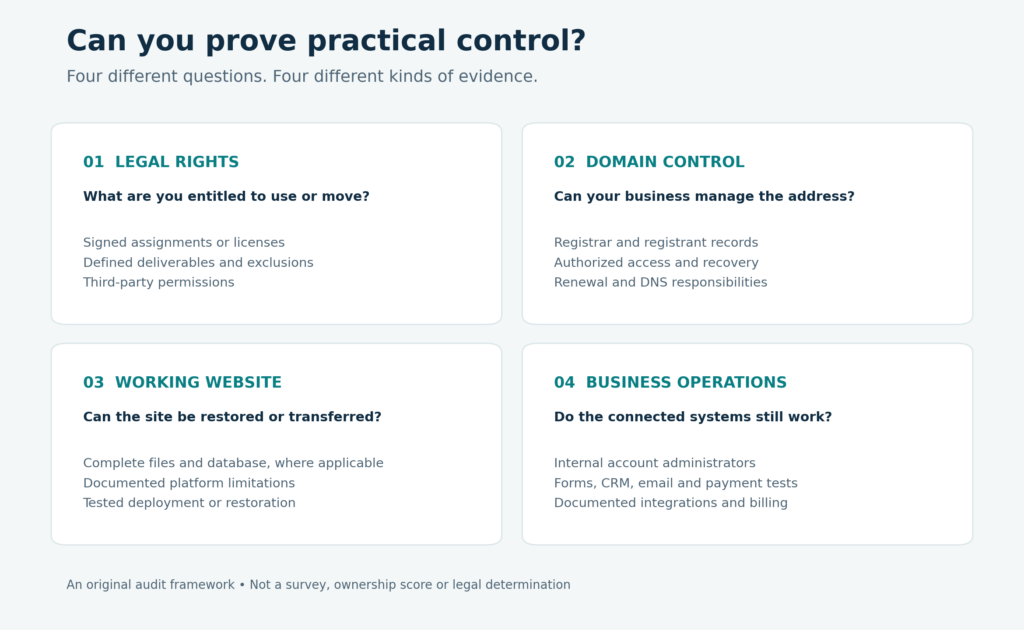
Figure 1. An original audit framework, not survey data. Legal rights, domain control, a working restoration route and operational accounts each require their own evidence.

Trap 4: How Do I Regain Control of Google Analytics From a Previous Agency?
The trap: receiving the website while leaving the systems that measure and operate it under someone else’s exclusive control.
The site may still load, but where do its inquiries go? Who can change the tracking tags? Who receives payment alerts? Can your team access the account that stores customer conversations?
These gaps can be especially frustrating because they often become visible slowly. Reports stop updating. A form sends messages to an old inbox. An automation relies on a former agency employee’s connection. You are still paying for traffic while losing confidence in what happens afterward.
Google Tag Manager’s own guidance recommends at least two active administrator accounts and says the account should be managed by someone inside your organization. It warns that losing the only administrator can cause account lockout. Give providers appropriate individual permissions and maintain internal administrative continuity.
Search Console has a separate issue: removing a previous verified owner from the user list may be insufficient if their verification tokens remain. Google’s instructions explain how those tokens can enable re-verification. Establish your own verified access before removing old permissions or tokens.
| System | Evidence your business should retain | Meaningful handover test |
| Google Analytics | Correct account/property IDs and appropriate internal admin access | Confirm access management and the intended historical reports |
| Google Tag Manager | Account administration and necessary container permissions | Review versions and confirm who can publish |
| Search Console | Verified ownership controlled by your business | Review owners and verification methods |
| CRM and inquiry forms | Authorized access, field definitions and integration details | Submit a test inquiry and trace it to the correct pipeline |
| Email, booking and payment services | Account control, billing and recovery arrangements | Complete the relevant customer journey |
| API integrations | Service inventory and securely managed credentials | Validate replacement connections before retiring old credentials |
This is why CRM services for small businesses and API development and integration belong in the ownership discussion. Your operational independence depends partly on whether inquiries, bookings and transactions can continue after a provider changes.
Current security research reinforces the value of managing external dependencies. Verizon reported third-party involvement in 30% of breaches in its 2025 DBIR and 48% in its 2026 DBIR. That is an increase of 18 percentage points, or 60% relative to the earlier figure.
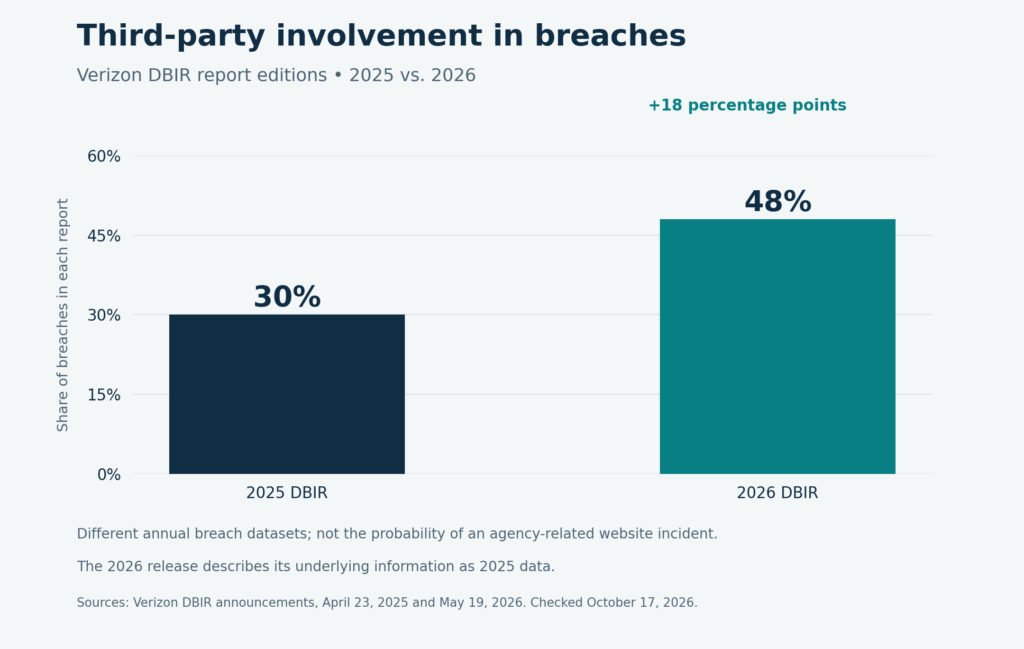
Figure 2. Report-edition comparison, not the probability that a marketing agency will compromise your website. These are different annual breach datasets; the 2026 release describes its underlying information as 2025 data. Third parties include a broader range of suppliers and dependencies than marketing agencies.
The practical response is to maintain named administrators, appropriate permissions, recovery arrangements and a documented service inventory. Request only client-specific information your business is authorized to receive; an agency should not expose other clients’ data or shared secrets to complete your handover.
Are Advertising Agencies Subject to the FTC Act?
Yes. The FTC says advertising agencies may share legal responsibility for misleading advertising claims, depending on their participation and what they knew or should have known. It also explains that advertising must be truthful, non-deceptive and supported by appropriate evidence.
For website services, promises such as “you own everything” or “you can move anywhere” should be assessed against the actual contract, licenses and technical restrictions. Whether a particular statement violates the law depends on the circumstances. These principles do not automatically decide a private ownership dispute or create an immediate right to every requested file.
There is no single ownership rule that resolves every layer of an agency-built website. Distinguish the following sources of obligations:
| Framework | Relevant issue | Important scope limit |
| Federal Copyright Act | Authorship, work made for hire and copyright transfers | Copyright rights differ from account access and possession of files |
| FTC advertising principles | Truthful and substantiated marketing representations | Application and responsibility depend on the facts |
| Applicable state contract law | Deliverables, license rights, termination and remedies | Contract terms and jurisdiction matter |
| Applicable privacy laws | Handling customer information during and after handover | Coverage, exemptions and data-processing roles differ |
| ICANN policy and provider terms | Domain transfers, account permissions and export capabilities | These are distinct from U.S. statutes |
For current privacy context, California’s completed CCPA regulations package took effect January 1, 2026, covering updates including risk assessments, cybersecurity audits and automated decisionmaking. Coverage and compliance schedules are provision-specific; these requirements do not apply uniformly to every U.S. small business or agency.
Where the CCPA applies, service-provider arrangements do not erase the covered business’s responsibilities to consumers. Treat customer information as regulated information, not simply another asset you can transfer without conditions. Preserve applicable consent records and suppression preferences, restrict access, and agree on lawful retention or deletion with your providers.
This article provides general U.S. business information, not advice on a particular dispute. Have qualified counsel review contested rights, termination provisions and applicable state requirements.

What Should My Agency Contract Say About Ownership?
It should identify the deliverables, the rights attached to them and the practical steps for continuing without the agency.
You should be able to explain the arrangement in ordinary language. If you cannot tell whether leaving means a routine transfer, a license change or a rebuild, the agreement needs clarification before you rely on it.
| Contract topic | Detail to negotiate | Evidence of completion |
| Original deliverables | What is assigned or licensed, and when rights take effect | Signed documents and an identified asset list |
| Third-party components | Exclusions, permitted uses and renewal costs | License and dependency register |
| Accounts and domain | Account holder, administrators, billing and recovery responsibilities | Verified roles and registrar records |
| Source and design files | Included formats, repositories and documentation | Delivered files and working access |
| Transition assistance | Named tasks, deadlines, fees and service overlap | Written handover schedule and acceptance criteria |
| Data and privacy | Authorized exports, security, retention and deletion | Documented transfer and appropriate completion records |
| Termination and disputes | Notice, outstanding payments and any agreed suspension rights | Clear procedures reviewed for applicable law |
A specific deadline is useful because it makes performance measurable. However, an agreed “ten business days” is a negotiated term, not a blanket federal rule. Likewise, a promise of free transition assistance needs a defined scope; it should not leave both parties arguing about whether rebuilding an integration was included.
Managed hosting and maintenance can be worthwhile. Document what the service provides, what ends when it ends, and what you can retain or move. Clarity gives both parties a workable way to resolve the relationship without turning the website into an emergency bargaining tool.
Do I Own the Files and the Domain, and Can I Leave With Everything?
Answer with evidence before you make a major change. You do not need to confront a provider or rebuild a functioning site simply because one part of the arrangement is unclear.
Start with the following review:
| Priority | Action | A useful result |
| 1 | Collect contracts, amendments, invoices and licenses | A written record of rights and obligations |
| 2 | Verify domain, renewal and recovery arrangements | Your business can manage the registration through authorized channels |
| 3 | Test internal access to critical accounts | Correct roles work for the correct business assets |
| 4 | Obtain the agreed files and exports | The handover package is complete enough to evaluate |
| 5 | Demonstrate restoration or document a platform limitation | You know what a future move will require |
| 6 | Test forms, email, payments and reporting | Customer journeys and business operations continue |
| 7 | Complete the agreed transition and update permissions | Dependencies are resolved before old access is retired |
If a provider refuses a legitimate request, preserve the correspondence and identify the exact missing right or asset. Use the registrar or platform’s official support process for account issues, and seek legal review where contractual ownership is disputed. Do not assume possession of a password settles the legal question—or that a contractual right guarantees an immediate technical recovery.
If you are planning a new website or reviewing an existing arrangement, talk to Prevello about your website project. Bring your platform details, current agreement and the systems your website depends on so the discussion can address your actual requirements.
You should be able to decide whether to stay with an agency because its work serves your business. Establishing your rights, access and transfer options gives you the information to make that decision with confidence.