
The new website looks better. Your inbox is quieter.
You approved the redesign because the old site was supposed to be holding your business back. You invested money, reviewed layouts, and worked toward launch day expecting customers to find it easier to contact you.
Now you are refreshing the traffic report and wondering what happened.
Did we damage our Google rankings? Are customers landing on broken pages? Should we bring the old website back?
Before making another expensive change, find out what actually declined. A missing tracking tag can make reports look worse. A broken redirect can send customers to the wrong destination. An accidental indexing restriction can interfere with search visibility. Each problem needs a different response.
The difficult part is waiting while the cause remains unclear. Every quiet day raises another concern: how many inquiries are being missed, and how much longer can the business afford the uncertainty?
An explanation such as “Google needs time” should come with evidence. Your team needs to show which pages are affected, what changed at launch, and what it has tested.
Start by comparing search activity, analytics, and actual customer requests. Then check whether important pages can be reached, whether old URLs lead somewhere useful, and whether visitors can complete a form or booking on their phones.
The five-step checklist below turns those checks into a practical recovery plan, with clear evidence to collect and results to monitor after each fix.

Traffic can drop after a redesign because measurement changed, search engines cannot access important pages, URLs and content were mishandled, or the new experience creates friction. A redesign can also coincide with changes in demand or search results that require a separate investigation.
The way forward is a five-step diagnostic process. Begin with evidence, repair the problems affecting customers and discovery, and then monitor whether the fixes produce meaningful improvement.
The checklist below gives your team a shared plan before it starts making more changes.
| Step | Main task | Evidence you need |
| 1 | Confirm what actually declined | Comparable search, analytics, and inquiry records |
| 2 | Restore access and indexability | Tests of important URLs and their current indexing signals |
| 3 | Repair URL mapping and preserve useful content | Verified redirects, functioning links, and content comparisons |
| 4 | Check speed, usability, and conversion paths | Performance tests and completed customer tasks |
| 5 | Monitor recovery and document decisions | A dated issue log, meaningful metrics, and verified fixes |
Step 1: What’s the First Thing You Check When a Site Loses Rankings After a Redesign or Migration?
Confirm whether you are looking at a real loss of visitors, a change in reporting, or a loss of inquiries despite similar traffic.
If the website is unavailable, restore access while you investigate the reports.
Start with Google Search Console. Its Performance report provides clicks, impressions, click-through rate, and average position for Google Search. Segment the data by affected pages, queries, devices, and countries to locate the decline.
Then compare that pattern with Analytics and operational records. Search Console clicks and Analytics sessions are different measures; you should interpret their relationship rather than expect identical totals.
A redesign may have changed the Analytics property, removed a tag, altered consent behavior, or broken a lead event. Google’s consent-mode documentation explains that tag behavior changes according to consent settings.
Use the following patterns to decide what to investigate first. They suggest possibilities rather than prove a cause.
| Observed pattern | Possible explanation | Useful next check |
| Analytics sessions fall while Google Search clicks remain similar | Measurement or reporting configuration changed | Verify tags, property IDs, consent settings, and filters |
| Search clicks and impressions both fall | Reduced visibility, access problems, or lower search demand | Inspect affected pages and compare query patterns |
| Impressions remain similar but clicks fall | Changed search-result presentation or competitive conditions | Review titles, snippets, position, and search appearances |
| Search clicks remain similar but accepted inquiries decline | A conversion-path or offer problem | Test forms, telephone links, booking, and checkout |
| Many channels appear to decline together | A broad site problem or a shared measurement failure | Check availability and validate collection independently |
Google recommends examining the shape of a search-traffic decline and comparing similar periods. Broader historical context can help identify seasonality; an abrupt change around launch warrants checking the launch changes themselves.
Record the redesign date, hosting or domain changes, tracking updates, consent-platform changes, and major content edits. Ask the team to explain what changed and when.
Avoid comparing a complete prelaunch week with an incomplete postlaunch period. Consider differences in weekdays, campaigns, and seasonal demand. Break down the most commercially important pages instead of relying only on a site-wide total.
Check whether real customer requests are arriving. Your form database, booking system, call records, and CRM can help distinguish missing reporting from missing business. Well-organized CRM services for small businesses can support that comparison.
Privacy requirements belong in this review. For businesses covered by California’s CCPA, relevant notices, applicable sale-or-sharing opt-outs, and qualifying Global Privacy Control signals must be handled appropriately. Updated California regulations took effect on January 1, 2026, with separate schedules for some provisions.
Restore accurate measurement while respecting applicable choices and requirements. Removing privacy controls simply to increase reported sessions is not a sound recovery method.
Acceptance check: Your team can identify the channel, pages, period, and business outcome affected, and can explain any known measurement changes.
Step 2: Does Anyone Know Why My Site Is Not Being Indexed by Google?
A page can look correct in a browser while sending signals that prevent or complicate its appearance in search.
During development, teams often restrict staging sites. A launch mistake can carry those restrictions onto public pages. Another common problem is a template that points canonical URLs to staging, an old domain, or an unintended destination. A canonical declaration identifies the preferred version of a page when multiple URLs contain similar content.
Check important pages individually. Include the homepage, priority services, valuable articles, and pages that previously generated inquiries. A homepage test alone cannot establish that the rest of the site works.
Search Console’s URL Inspection tool provides information about the indexed version and allows a live test. The two views answer different questions, so inspect both when diagnosing a recent change.
Organize the findings by the actual obstacle.
| Finding | Why it matters | Corrective action |
| Accidental noindex on a public page | The page is being instructed to stay out of the index | Remove the unintended instruction from pages intended for search |
| Crawling blocked by robots rules | Search engines may be unable to fetch needed content or signals | Correct the specific public-page or resource restriction |
| Canonical points to the wrong URL | Consolidation signals may favor an unintended page | Align canonical signals with the intended public URL |
| Server errors or unexpected access denial | Customers and crawlers may not receive the page | Fix the availability, application, or access problem |
| Main content missing from the rendered page | The redesigned page may not present its intended information | Review rendering and the availability of important content |
| Sitemap and internal links reference obsolete URLs | Discovery paths may lead to the wrong places | Update them to appropriate current destinations |
Be precise when changing indexing controls. Private areas and genuine staging environments may still need restrictions. The task is to correct accidental restrictions on content intended to be public.
Google explains that a crawler must be able to access a page to see its noindex instruction. Blocking crawling and controlling indexing are different mechanisms.
Canonical declarations also need consistent implementation. Review the preferred URLs, redirects, internal links, and sitemap together rather than changing a single tag without considering the other signals.
If the redesign introduced a JavaScript framework or changed how content loads, inspect what Google can render. Google can process JavaScript, but rendering and resource access can introduce issues that need diagnosis.
After fixing a problem, test representative URLs from each affected template. Verify the live response and signals, and monitor subsequent indexing changes. A successful live test or an indexing request does not guarantee inclusion in search.
Professional SEO services should help translate these findings into a prioritized fix list, with URLs and verification evidence your business can understand.
Acceptance check: Important public pages are reachable, present their intended content, and no longer contain accidental blocking or conflicting indexing signals.

Step 3: Do Too Many 301 Redirects Affect SEO?
The practical question is whether your redirects correctly connect old destinations to their relevant replacements.
A redesign can change service-page names, product paths, blog URLs, navigation, and domain variants. If old links stop working, customers and search engines can lose routes to valuable content.
Build a URL map using available historical reports, old sitemaps, previous site records, and links that still send visitors. Prioritize pages with relevant search traffic, inquiries, or important external links.
For a permanent move, Google recommends permanent redirects where appropriate, including HTTP 301 or 308. It also advises redirecting directly to the final destination and avoiding unnecessary chains.
The examples below illustrate the mapping decisions. These are sample paths, not an audit of Prevello or a client website.
| Old-page situation | Appropriate treatment | Verification |
| Page and URL remain valid | Keep the functioning URL | Confirm the expected content and response |
| Service moved to a new path | Redirect to the corresponding service page | Confirm the final page is relevant and accessible |
| Several pages were genuinely consolidated | Redirect to the useful consolidated replacement | Confirm it covers the former pages’ purpose |
| Page was permanently removed with no suitable replacement | Return an appropriate 404 or 410 | Confirm there is no misleading redirect |
| Existing redirect leads through several URLs | Update it to the appropriate final destination | Test for chains, loops, and broken endpoints |
Avoid sending every missing page to the homepage. Google’s migration guidance warns that many redirects to an irrelevant single destination can confuse users and may be treated as soft 404s.
Redirects also cannot substitute for useful content. A shorter replacement page may omit information customers previously needed to make a decision. Compare service explanations, headings, pricing conditions, location details, and internal links with the previous version.
Restore accurate, helpful information your business is entitled to publish. Preserve the page’s purpose rather than mechanically copying every old sentence.
Check navigation on real devices. A page moved out of the menu and disconnected from related content may become difficult for people to find even when its URL still works.
Use the sitemap to list the intended current URLs, then verify important internal links. Reserve domain-move tools for situations where they actually apply; a visual redesign does not automatically require a Change of Address request.
A documented SEO strategy should connect URL mapping, content decisions, and business priorities. That makes it easier to preserve what worked while introducing justified improvements.
Acceptance check: Important old URLs reach relevant destinations, useful content remains available, and internal links support the intended customer journey.
Step 4: How Do I Speed Up My WordPress Site?
A redesign can add large images, video, animation, fonts, and third-party widgets. Customers experience the result through the time and effort required to use the page. The same checks apply to other platforms.
That matters emotionally as well as technically. Someone seeking an urgent appointment or estimate may feel that your business is unavailable when the page stalls. A button that moves while they tap can make the site feel unreliable.
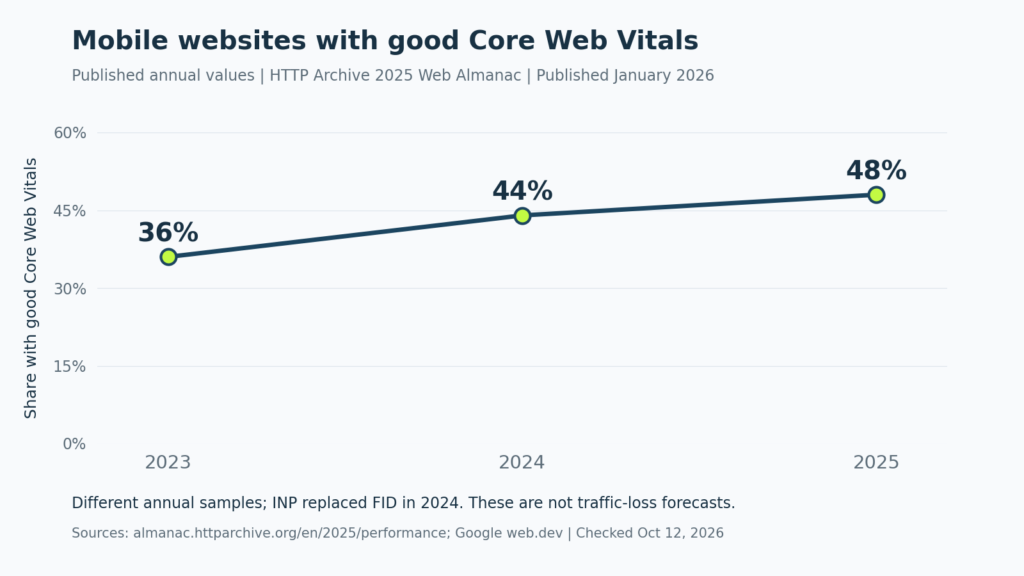
The 2025 Web Almanac’s Performance chapter, published in January 2026, reports that the share of mobile websites with good Core Web Vitals increased from 36% in 2023 to 44% in 2024 and 48% in 2025.
These are descriptive web-sample figures. They are not a forecast of traffic loss following a redesign. Annual samples differ, and Interaction to Next Paint replaced First Input Delay as a Core Web Vital in March 2024.
The same edition provides additional context about page payload. Its Page Weight chapter’s Figure 14.2 reports July 2025 median inner-page weights of 1,963 KB on desktop and 1,769 KB on mobile.
Keep the data period visible when using these benchmarks.
| Published benchmark | Reported value | Interpretation |
| Mobile websites with good Core Web Vitals, 2023 | 36% | Historical annual sample |
| Mobile websites with good Core Web Vitals, 2024 | 44% | Annual assessment after the responsiveness-metric change |
| Mobile websites with good Core Web Vitals, 2025 | 48% | Descriptive web-performance benchmark |
| Median desktop inner-page weight, July 2025 | 1,963 KB | Page-weight value reported in Figure 14.2 |
| Median mobile inner-page weight, July 2025 | 1,769 KB | Page-weight value reported in Figure 14.2 |
These chapters were published in 2026 but describe earlier data. Use them to frame investigation; your own pages need their own measurements.
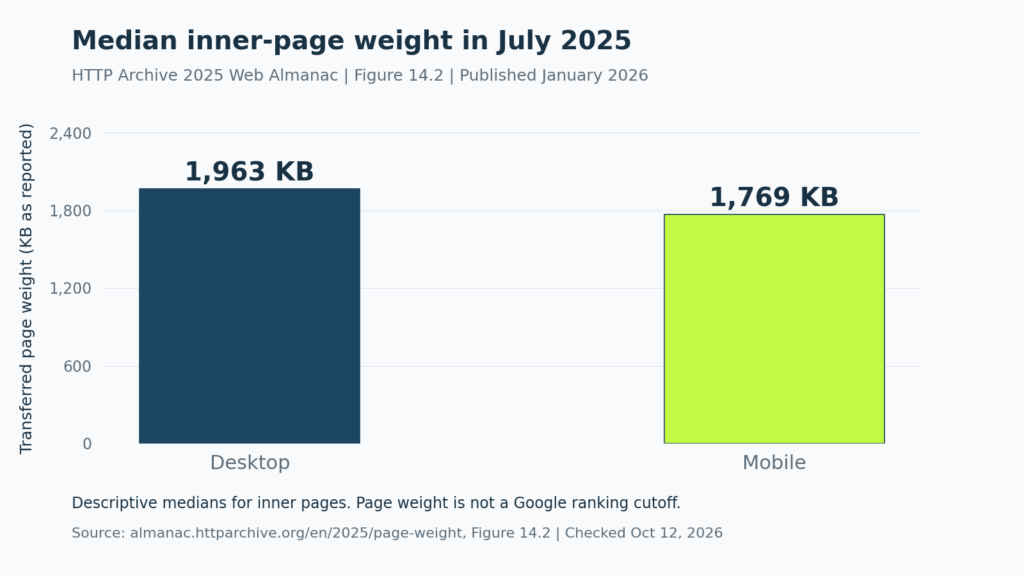
Page weight is not a Google ranking cutoff. Examine when important resources load, how the page responds, and whether the layout stays stable.
Google’s recommended good Core Web Vitals thresholds are assessed at the 75th percentile of page loads, with mobile and desktop considered separately.
| Metric | What it measures | Recommended good threshold |
| Largest Contentful Paint | Loading of the main visible content | 2.5 seconds or less |
| Interaction to Next Paint | Responsiveness to interaction | 200 milliseconds or less |
| Cumulative Layout Shift | Visual stability | 0.1 or less |
Ask the developer to identify the bottleneck. A large hero image, delayed resource discovery, excessive script execution, and slow server response require different fixes. Google’s LCP guidance emphasizes making the important resource discoverable and loading it without unnecessary delay.
Retest the tasks customers actually need to complete. Submit a form, open the booking process, tap the telephone link, and verify the request reaches the intended team. Performance work should preserve those functions.
If the problem followed a theme or template change, WordPress website design decisions should account for performance and usability alongside appearance.
Accessibility should also be part of acceptance testing. Check labels, contrast, keyboard operation, zoom, and understandable error messages. The U.S. Department of Justice takes the position that ADA requirements extend to online goods and services offered by covered public accommodations; applicability depends on the business and legal context.
When reviewing landing page design, evaluate whether visitors can understand the offer and contact you comfortably. A visually attractive page still needs a reliable route to an inquiry.
Acceptance check: Performance problems have been investigated with evidence, and important customer tasks work on the devices and browsers your audience uses.
Step 5: How Long Should We Realistically Expect Recovery to Take?
Recovery depends on what broke, how widely it affected the site, and what changed beyond the design.
A missing Analytics tag may be corrected quickly, although the missing observations may not be recoverable. A broken form can resume accepting requests after repair. Search visibility may take longer to respond because crawling, indexing, and evaluation are involved.
Avoid accepting a universal recovery deadline without an explanation. Google’s migration guidance describes temporary fluctuations and notes that processing time depends on the scale and circumstances of the move.
Give your team a record that separates completed technical fixes from business outcomes still being monitored.
| Issue | Evidence the fix is live | Outcome to monitor |
| Incorrect measurement | Expected collection behavior works in testing | Consistent reporting under the documented configuration |
| Accidental indexing restriction | The current URL presents the intended signals | Subsequent indexing and search visibility |
| Broken redirect | The old URL reaches the relevant working destination | Errors, discovery paths, and affected-page search activity |
| Missing or weakened content | The intended useful content is available | Relevant queries, inquiries, and customer feedback |
| Slow or unusable lead path | Tests complete successfully on relevant devices | Accepted requests and qualified opportunities |
Assign an owner, status, and validation method to every issue. Keep a dated change log so later movements can be interpreted alongside the work performed.
Review technical delivery frequently while repairing critical issues. Assess search and business outcomes over comparable, complete periods. Field performance reports also reflect accumulated user experiences, so they may not immediately mirror a newly improved test result.
Do not repeatedly redesign the same page because the first report after a fix looks disappointing. Confirm the fix, investigate remaining problems, and make the next change for a documented reason.
If paid campaigns were affected by new destinations or broken lead tracking, include them in the review. A Google Ads management team should verify relevant landing pages and conversion definitions before interpreting post-redesign results.
Agency reporting needs to remain truthful. Under FTC guidance, advertising claims require support, and agencies may share responsibility for misleading claims. An agency should be able to substantiate performance promises and explain material limits on its evidence.
Ask for a written recovery plan covering the suspected cause, affected pages, corrective actions, validation, and reporting. Define responsibilities and acceptance criteria within the engagement.
The privacy and accessibility considerations discussed here have their own scopes and exceptions. Technical SEO guidance is not a guarantee of legal compliance or rankings; relevant obligations should be evaluated for the business.
When discussing Prevello’s website and marketing services, start with the launch timeline, affected-page data, and customer-request records. Those inputs help turn a broad concern into concrete questions about scope and priorities.
You invested in the redesign to make your business easier to find and trust. Recovery work should serve that same purpose: accessible information, functioning pages, dependable measurement, and a comfortable path for customers to reach you.