
Watching mobile traffic grow while your inbox stays quiet can feel like paying to open a store that nobody enters. You have invested in advertising, content, and a website. The reports show visitors. Your sales team still needs conversations.
That gap creates uncomfortable questions. Are you attracting the wrong people? Did the redesign actually help? Should you spend more, change agencies, or rebuild everything again?
Your customers experience a different frustration. They may be comparing providers during a lunch break, searching for urgent help, or trying to find a price without starting a sales conversation. A slow page, confusing button, or demanding form can turn a genuine need into another abandoned visit.
Mobile inquiries depend on a complete journey: the right visitor, a relevant offer, a usable page, a trustworthy request, and a reliable response. A failure anywhere along that journey can keep traffic from becoming business.
The following questions help locate those failures. The legal considerations reflect current U.S. guidance and regulations; applicability depends on the business, state, and activity involved.

Why Is My Conversion Rate Extremely Low?
Start by defining the conversion you actually need. A visitor opening a contact page, tapping a telephone number, submitting a request, and becoming a qualified prospect are different events.
If your report treats every button click as a lead, the dashboard may look healthy while your team receives very little usable business. If legitimate inquiries arrive through calls but your report counts only forms, you may underestimate performance.
Next, compare mobile and desktop visitors within similar conditions. Look at the same service page, traffic source, geography, and period. A mobile audience reading educational articles is different from a desktop audience searching for a specific provider.
For example, someone reading about a home repair problem may want instructions. Someone looking for a technician available in their city may want an appointment. Both visits can have value, but they carry different levels of readiness.
Review whether your landing page matches the visitor’s immediate need. State the service, location or eligibility requirements, and next step clearly. Explain what happens after an inquiry.
The emotional barrier matters here. A visitor may worry that requesting information means agreeing to an expensive consultation or entering a relentless sales process. Accurate language such as “Request an estimate” can make the commitment clearer.
Treat a low conversion rate as a problem to investigate through audience and behavior data. Increasing traffic before understanding the gap can increase the amount you spend on the same unresolved problem.
How to Optimise for Mobile?
A layout that shrinks to fit a phone is only the beginning. Test whether a customer can understand your offer and contact you comfortably.
Open an important landing page on a real phone. Before scrolling, identify the service, who it helps, and the next action. If oversized images and vague slogans occupy the screen, useful information may be buried.
Give the page a primary action that matches the visitor’s goal. “Request a Quote,” “Check Availability,” or “Book a Consultation” should accurately describe the next step. A prominent call button can help people who prefer a conversation.
Keep navigation manageable. Check whether sticky headers, chat widgets, and cookie notices cover content or block a form when the keyboard opens. Make buttons easy to distinguish and tap, and ensure text remains readable when enlarged.
Accessibility is part of this experience. Clear form labels, understandable instructions, and useful error messages help visitors complete tasks. W3C’s guidance also explains how larger clickable areas assist people with limited dexterity.
Accessibility has legal relevance as well. The U.S. Department of Justice takes the position that ADA requirements apply to goods and services offered online by covered public accommodations. A business’s obligations depend on its circumstances; applicable requirements should be assessed for that business.
A useful review asks a customer to complete a real task while you observe. Watch where they pause, scroll back, or ask what a button means. Their hesitation can reveal friction that your team has learned to overlook.
How Do I Speed Up My WordPress Site?
A slow website asks customers to spend their patience before they have seen your value.
That is especially frustrating when someone needs help quickly. A visitor searching for an appointment, an urgent repair, or a service estimate may leave while your page is still loading.
Use real-user performance data alongside controlled tests. Google’s Core Web Vitals assess loading, responsiveness, and visual stability. Its recommended “good” thresholds are:
- Largest Contentful Paint: 2.5 seconds or less.
- Interaction to Next Paint: 200 milliseconds or less.
- Cumulative Layout Shift: 0.1 or less.
These targets are assessed at the 75th percentile, with mobile and desktop considered separately. They describe technical experience rather than predicting a particular lead conversion rate.
For a WordPress site, investigate heavy images, unnecessary scripts, third-party widgets, theme behavior, caching, and server response. The same diagnostic approach applies to other platforms.
Ask your developer to identify the actual bottleneck before changing hosting or installing another optimization plugin. A problem caused by a large hero video may need a different fix from a slow server response.
Then retest the inquiry journey. Confirm that the page loads, the button responds, and the form still submits correctly. Performance improvements should preserve the features customers need to contact you.

Contact Form Fails to Submit on Mobile but Works Fine on Desktop?
This failure can be painful because the visitor has already decided to reach out.
They type their details, explain their problem, and press submit. An error appears, the page refreshes, or nothing happens. They may assume your business is unreliable before anyone on your team knows they tried.
Test the complete process on multiple real devices and browsers. Include the browsers used inside social apps if those apps send significant traffic. Check the first visit as well as a returning visit.
Verify submission, storage, notification, and assignment separately. A form can accept a request while its email notification fails. A notification can arrive while the CRM fails to create a record.
Also examine the work required before submission. Ask for information needed to handle the initial request. A brief inquiry might need a name, a preferred contact method, and the service requested. Detailed qualification can follow when appropriate.
W3C recommends avoiding irrelevant or excessive questions and providing clear notifications for successful completion and errors. Where a longer form is necessary, logical steps and visible progress can help users understand the task.
Privacy affects this decision too. Explain how you will use contact details, link relevant notices, and make any marketing permissions clear. Someone requesting a quote may be concerned about receiving unwanted calls or having their information shared.
For covered businesses, California’s CCPA requires relevant notices and rights, including applicable opt-outs from sale or sharing and recognition of qualifying Global Privacy Control signals. Updated CCPA regulations took effect on January 1, 2026, with separate compliance schedules for some new provisions. Requirements depend on coverage and processing activities.
Keep privacy controls readable and usable on a phone. Test whether visitors can understand their options and complete an ordinary inquiry after making a privacy choice.
Any Benefit to Showing Prices on Your Website?
Customers sometimes avoid inquiries because they cannot tell whether your service is within reach.
They may fear an awkward conversation about a budget they cannot afford. They may also worry that submitting a form will trigger pressure to buy before they understand the cost.
Publishing an exact price is not practical for every service. Custom work can depend on scope, location, timing, materials, or eligibility. You can still explain the factors that determine an estimate.
Where appropriate, show realistic ranges, representative packages, or a truthful starting price with the conditions that affect it. Explain whether an initial consultation has a fee and what a customer receives.
Pricing clarity helps visitors decide whether contacting you makes sense. Evaluate its effect on qualified inquiries and sales, because a higher number of unsuitable leads can create additional work.
Trust signals should answer practical questions as well. Use relevant examples, authentic customer experiences, verified credentials, and clear business information. A visitor should be able to understand why you are qualified to help.
Under FTC guidance, advertising claims must be truthful and supported. Agencies can share responsibility for misleading claims and have a duty to independently check substantiation.
The FTC’s Consumer Reviews and Testimonials Rule, effective October 21, 2024, also addresses fake or false reviews and certain other deceptive review practices. Agencies are not automatically protected from liability. Invented customer stories or fabricated endorsements create legal and credibility problems.
Show evidence a prospective customer can evaluate. Avoid promises of guaranteed results unless the claim is accurate, supportable, and presented with all material conditions.
How Do I Actually Track Calls in Google Ads?
A mobile visitor can contact you successfully without completing a form. That makes call measurement important for businesses that sell through conversations.
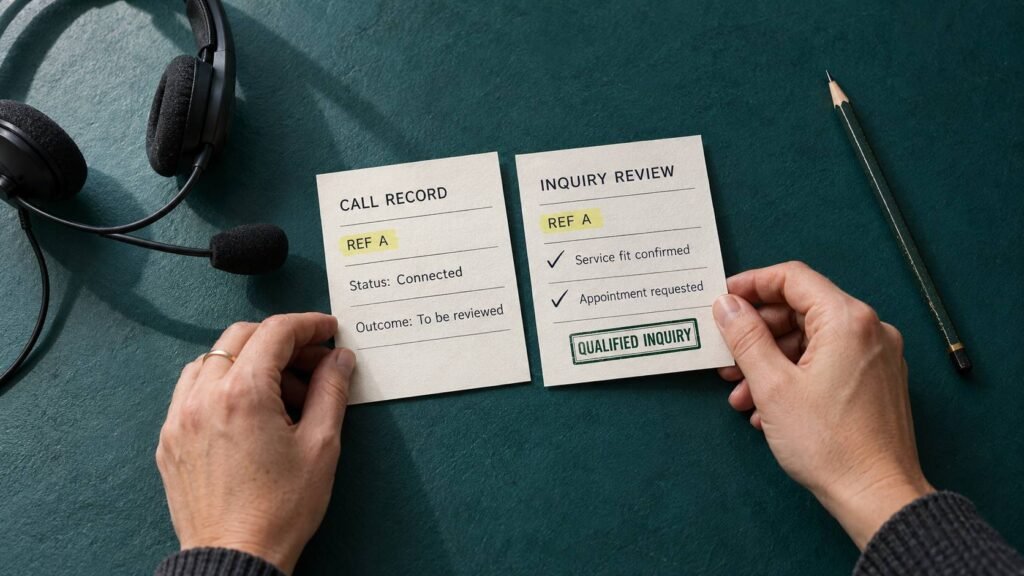
Separate a telephone-link click from a connected call and a qualified inquiry. Someone can tap a number and cancel before dialing. A connected call may be a wrong number, an existing customer’s question, or a genuine sales opportunity.
Google Ads supports different phone-call conversion measurement methods, including calls associated with website visits. Choose and validate the method that matches the outcome you intend to report.
For forms, confirm that your lead event reflects an accepted submission. A submit-button click or a visit to a thank-you page can produce misleading counts if the implementation does not account for errors or repeat visits.
Compare analytics with operational records. Your form database, CRM, appointment system, and call records should help explain where real inquiries arrive and where they stop progressing.
For a hypothetical example, suppose 1,000 comparable mobile sessions produce 40 form starts, 12 accepted requests, and six qualified prospects. The accepted-request rate is 1.2%, while the qualified-prospect rate is 0.6%. Those numbers illustrate different stages; they are not industry benchmarks.
Tracking limitations also matter. Privacy choices, browser restrictions, and people returning on another device can create gaps. Describe those limits when interpreting reports.
Use privacy-aware measurement, and keep personal form contents out of ordinary analytics events. The goal is a dependable view of business outcomes with appropriate handling of customer information.
How Fast Do You Respond to Contact Form Leads?
A successful submission creates an expectation. Your customer has invested effort and now wants to know whether someone will help.
An automatic acknowledgment can confirm receipt and set a realistic response window. The next response should address the request, identify the person handling it, and explain the next useful step.
For an urgent service, a missed call can matter immediately. For a complex purchase, the customer may need time to compare options. Set response standards around your service, operating hours, and staff capacity.
Assign an owner to every inquiry. Route requests correctly, make missed calls visible, and check whether after-hours submissions receive an accurate acknowledgment. Avoid promises such as “instant support” unless your operation can deliver them.
Marketing automation and CRM workflows can help coordinate acknowledgment, routing, reminders, and handoffs. The workflow should support a useful conversation.
Follow-up methods also need appropriate permissions. Covered telemarketing calls or texts using an automatic telephone dialing system, and covered marketing calls using an artificial or prerecorded voice, generally require prior express written consent under FCC rules, subject to exceptions. Applicable do-not-call and opt-out requirements also matter.
For commercial marketing emails, CAN-SPAM requires measures including accurate sender information, a valid postal address, and an effective opt-out process. Opt-out requests must be honored within ten business days.
Respect the customer’s preferences. Helpful follow-up can build confidence; repeated messages that ignore the request or an opt-out can damage it.

I Keep Redesigning Sites, but Conversions Don’t Really Improve. What Actually Matters Most?
Another redesign can feel reassuring because it produces something visible. New colors, imagery, and layouts create the impression of progress.
Business owners need evidence that the experience has improved. Start with the important mobile landing pages and locate the earliest point where suitable visitors struggle.
Fix a broken submission or incorrect call link promptly. Then evaluate slower-loading pages, unclear offers, demanding forms, missing information, and unreliable response processes.
An effective review connects each change to a customer problem. A smaller header can expose the contact action. A clearer price explanation can reduce uncertainty. A shorter form can remove unnecessary effort. Accurate confirmation text can reassure someone that their request arrived.
Where traffic volume supports an experiment, test a focused change and evaluate qualified inquiries. Where volume is limited, combine customer observation with technical checks and cautious before-and-after comparisons. Avoid declaring success from a handful of submissions.
Ask your marketing partner to connect recommendations to the whole journey: acquisition, landing-page experience, accepted inquiries, contact, and qualified opportunities. Agree on definitions and responsibility for each stage.
At Prevello, landing page design and follow-up workflows are relevant parts of that review. Begin with the pages and interactions that matter most to your customers, then measure whether changes make reaching your team easier.
Your mobile visitors arrive with a need and a limited amount of patience. Help them understand your service, evaluate it honestly, contact you comfortably, and receive a useful answer. That gives your marketing investment a clearer path toward real conversations.